

Not all product updates are created equal. While routine bug fixes keep the platform stable, major feature releases and significant UI overhauls are the milestones that define your product’s growth.
By using the Featured toggle, you can "pin" your most important updates to the top of your changelog, ensuring your biggest wins are the first thing users see.
Why "Feature" a Changelog?
Think of your changelog as a timeline of your product's evolution. While most entries show your daily progress, a Featured post highlights a big, important release.
By featuring a post, you ensure it is the first thing your users notice. It signals that a major feature they’ve been waiting for has been shipped and is ready to use.
Top-of-Feed Placement: Featured entries are prioritized, ensuring they remain at the top of your list or receive a dedicated spotlight, regardless of when other smaller updates were posted.
The "Featured" Tag: Every highlighted post is automatically labeled with a professional Featured tag, giving users a clear visual cue that this is a high-value update.
Strategic Focus: It allows you to guide the user's journey. Instead of them scrolling through minor maintenance notes, you’re directing them straight to the "big wins" that improve their workflow.
How to Feature and Pin an Entry
To get started with this feature, head to your Dashboard and navigate to the Changelog module. From there:
Open your Changelog and select the post you would like to feature and click Edit to open the editor. If you are already drafting a new update, you can jump straight to Step 2.
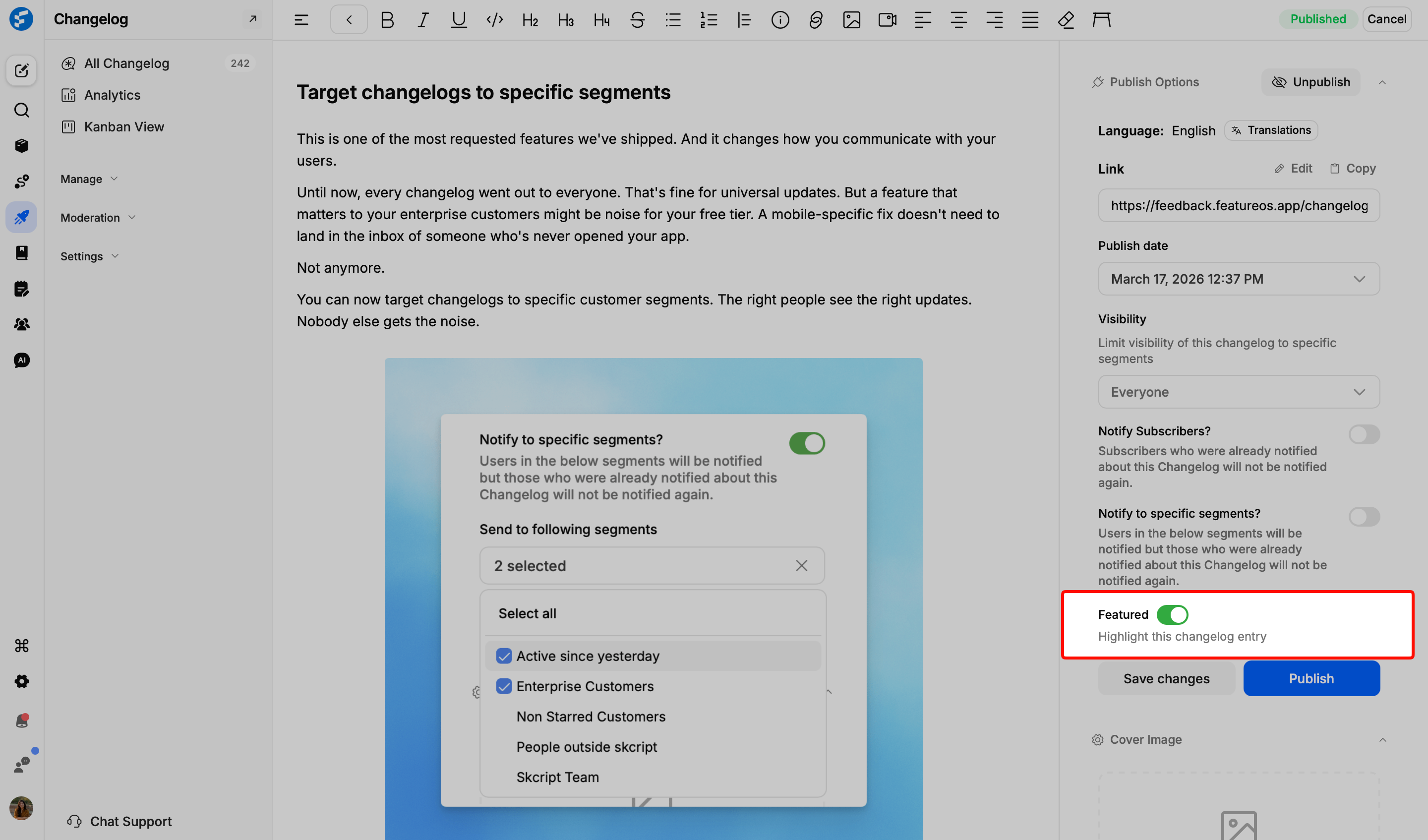
In the right-hand sidebar, scroll down to the bottom of the settings panel.
Flip the Featured toggle to the right. Once enabled, the toggle will turn green, and the Featured tag will be applied.
Click Save changes or Publish. Your post will now be pinned and tagged for maximum visibility.
Best Use Cases for Featured Posts
Major Feature Launches: When you ship a highly requested integration (like GitHub or HubSpot) or a completely new core functionality.
Closing the Feedback Loop: When you finally release a feature that had significant upvotes on your board, featuring it shows users you’ve truly delivered on their needs.
Simplified Discovery: Prospects don't want to dig through technical debt or minor patches. Featuring your best work allows them to skip the noise and see the "big picture" value of your product in seconds.
Need more help?
Reach out to our support at [email protected] or submit a request on our support board! 😃
Was this helpful?