

FeatureOS gives you flexible options for collecting feedback from users who are not signed in. Depending on how open or controlled you want your feedback boards to be, you can allow Guest Submissions, Anonymous Submissions, or both.
This article explains the difference between the two, when each option is useful, and how to enable them.
What Is Guest Submission?
Guest Submission allows users to submit feedback without signing in, but with an email address. The email field is mandatory for guest submissions and must be filled in before the post can be submitted.
This option reduces friction for users who don’t want to create an account, while still giving your team a way to identify who submitted the feedback and follow up if needed.
When to Use Guest Submissions?
Guest submissions are ideal when you want to collect feedback from:
Early users or beta testers who don’t yet have accounts
External stakeholders such as partners or clients
Website visitors who may not want to sign up just to share feedback
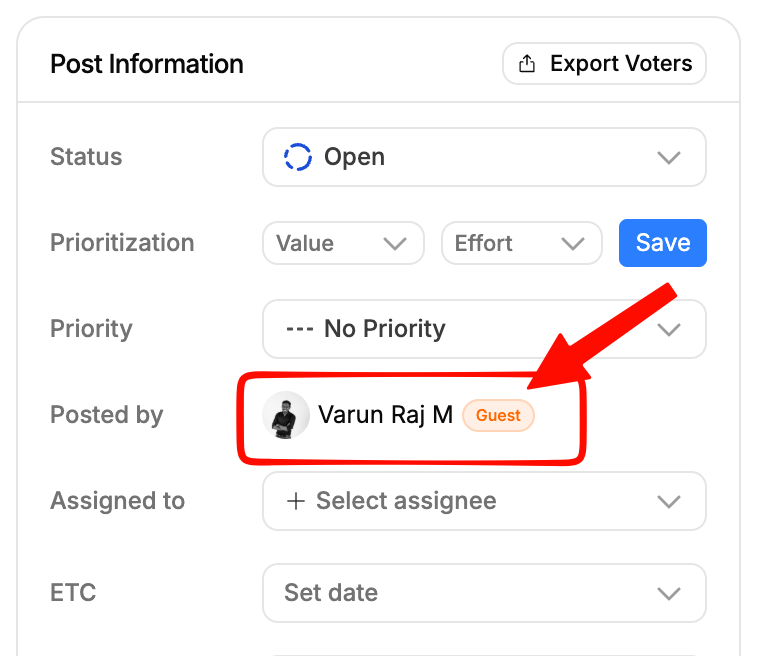
When a post is submitted with an email address via Guest Submission, the submitter’s name is shown normally, with a “Guest” labeldisplayed next to it inside the post details.
Guest Submissions and Moderation Behavior
If a feedback post is submitted as a guest using an admin’s email address, it will no longer be auto-approved. Instead, the post will follow your existing moderation rules.
If post moderation is enabled for the board, the submission will be sent to moderation and will require manual approval before it becomes visible. This ensures moderation rules are applied consistently, even when an admin email address is used in a guest submission.
This behavior helps prevent accidental bypassing of moderation while keeping your feedback workflow secure and predictable.
How Guest Submissions Appear in FeatureOS?
When a post is submitted with an email address, the submitter’s name is displayed along with a “Guest” label next to it in the post details.
What Is Anonymous Submission?
Anonymous Submission allows users to submit feedback without providing an email address.
When enabled, posts created this way are shown as coming from an Anonymous user. No identifying information is stored or displayed, which helps protect user privacy while still allowing open feedback.
Anonymous submissions are best suited for situations where users may hesitate to share feedback openly.
When to Use Anonymous Submissions?
Anonymous submissions work well when:
You want brutally honest or sensitive feedback
Users may be hesitant to share criticism publicly
You’re running internal feedback programs or research surveys
Privacy is a higher priority than follow-up communication
How Anonymous Submissions Appear in FeatureOS?
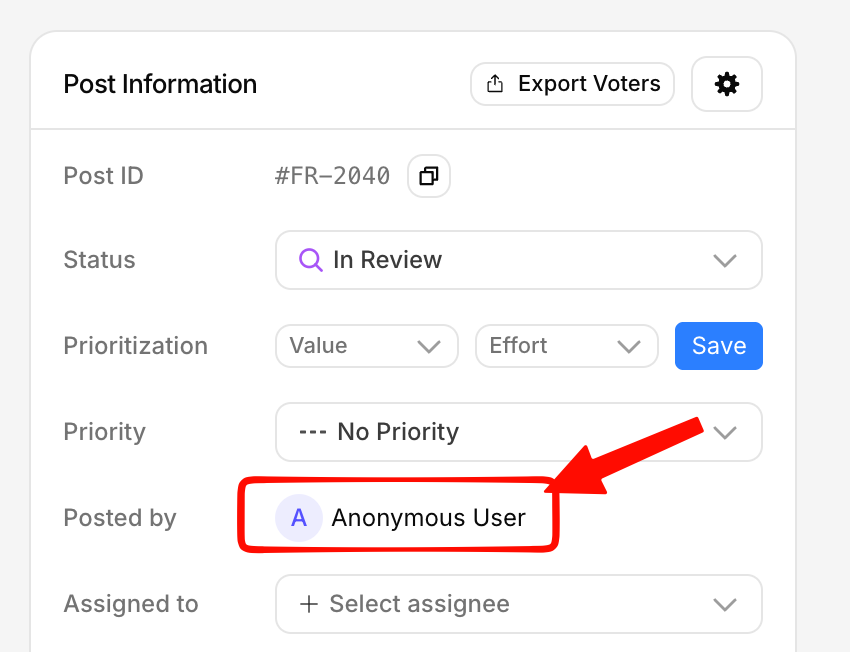
When a post is submitted without an email address, it is shown as coming from an Anonymous user.
No name or email address is displayed, but the post remains fully visible and manageable within your dashboard. This ensures transparency for your team while respecting user privacy.
Key Differences Between Guest and Anonymous Submissions
Guest submissions require an email address and appear with a Guest label next to the submitter’s name. Anonymous submissions do not require an email address and appear as Anonymous in your dashboard.
Guest submissions allow follow-ups and communication, while anonymous submissions prioritize privacy over traceability.
How to Enable Guest and Anonymous Submissions
You can manage both options from your Dashboard, then navigate to your Boards module, open Board Settings, and go to Privacy.
To enable Guest Submission, go to your Board Settings and toggle Guest Submission on. This allows users to submit posts without signing in, using their email address.
To enable Anonymous Submissions, toggle Anonymous Submissions on. This allows guests to submit feedback without providing an email address.
You can enable either option independently, or enable both depending on how open you want your board to be.
Recommended Setup
For most public feedback boards, enabling Guest Submission provides the best balance between ease of use and accountability.
If your goal is to encourage maximum honesty or reduce hesitation, enabling Anonymous Submissions can significantly increase participation.
You can adjust these settings anytime based on how your community engages with your boards.
Summary
Guest Submissions and Anonymous Submissions give you full control over how feedback is collected. Whether you want traceable feedback with email context or completely anonymous input, FeatureOS lets you configure your boards to match your needs, without compromising on clarity for your team.
Need more help?
Contact our support at [email protected] or submit a request on our support board! 😃
Was this helpful?